

Overview
The Flow variable nodes provide the ability to save state within an Incident to determine future behavior within a flow.
Functionality
The Flow Variables nodes expose the following functionality:
- Set or create Flow Variables via the
NL Incident Set Flow Variablesnode. - Add existing Flow Variables into a message via the
NL Incident Get Flow Variablesnode. - Route a message based on the value of a Flow Variables via the
NL Incident Flow Variable Routernode.
Flow Nodes
The display name of the node within the flows.
If Select Flow Variables is not checked, all exiting flow variables are added to the current message. If Select Flow Variables is checked, the list of flow variable Name values contains the case sensitive list of flow variables names to load and save into the current message.
The Output Field is the storage location for variables to be saved into the current message. The Output Field is relative to msg.payload. The flow variables are saved as name-value pairs within the Output Field. Any flow variable Name which does not currently exist for the incident is not saved into the Output Field. Missing flow variables are not considered an error case.
The display name of the node within the flows.
The Incident’s Flow Variable is tested based on the selected Test Operation.
The following list describes the Test Operation logic. For brevity in the equations shown, fv is the Flow Variable, tv is the Test Value, minv is the Minimum, and maxv is the Maximum.
- Equals: The
Flow Variableis checked for equality against theTest Value. This is useful for checking boolean, numeric, string, or JSON values. For a JSONFlow Variable, a deep object comparison will be done. Equation:fv == tv - Not Equals: The
Flow Variableis checked for inequality against theTest Value. This is useful for checking boolean, numeric, string, or JSON values. For a JSONFlow Variable, a deep object comparison will be done. Equation:fv != tv - Less Than: The
Flow Variableis checked to ensure that it is less than theMaximum. This is useful for checking numeric or string values. Equation:fv < maxv - Less Than or Equal: The
Flow Variableis checked to ensure that it is less than or equal to theMaximum. This is useful for checking numeric or string values. Equation:fv <= maxv - Greater Than:-The
Flow Variableis checked to ensure that it is greater than theMinimum. This is useful for checking numeric or string values. Equation:fv > minv - Greater Than or Equal:-The
Flow Variableis checked to ensure that it is greater than or equal to theMinimum. This is useful for checking numeric or string values. Equation:fv >= minv - Range (inclusive):-The
Flow Variableis checked to ensure that it is greater than or equal to theMinimumand less than or equal to theMaximum. This is useful for checking that a numeric or string value is within an inclusive range of values. Equation:minv <= fv <= maxv
The Test Value the Test Operation is checking against.
- string: Static text entered by user.
- number: Number entered by user.
- boolean: true or false
- msg.: Allows for the selection of an attribute within the message traversing the flow.
- flow.: This selects part of the flow context’s saved data as the source. This information is shared with only the nodes on a given tab.
- global.: This selects part of the global context’s saved data as the source. This information is shared by all nodes regardless of tab.
- J: expression: JSONata expression language to perform query and transform operations on the payload.
The display name of the node within the flows.
The variable Name is case sensitive and is the name of the variable to be used by other flow variable nodes throughout the flows.
The variable Type must be consistent throughout the flows to ensure value updates can be made in other NL-Incident-Set-Flow-Variables nodes.
The variable Value is the desired value of the variable.
Learn More
JSON Message Format
The following sample shows the JSON content, which conforms to Node Messaging Format.
Success
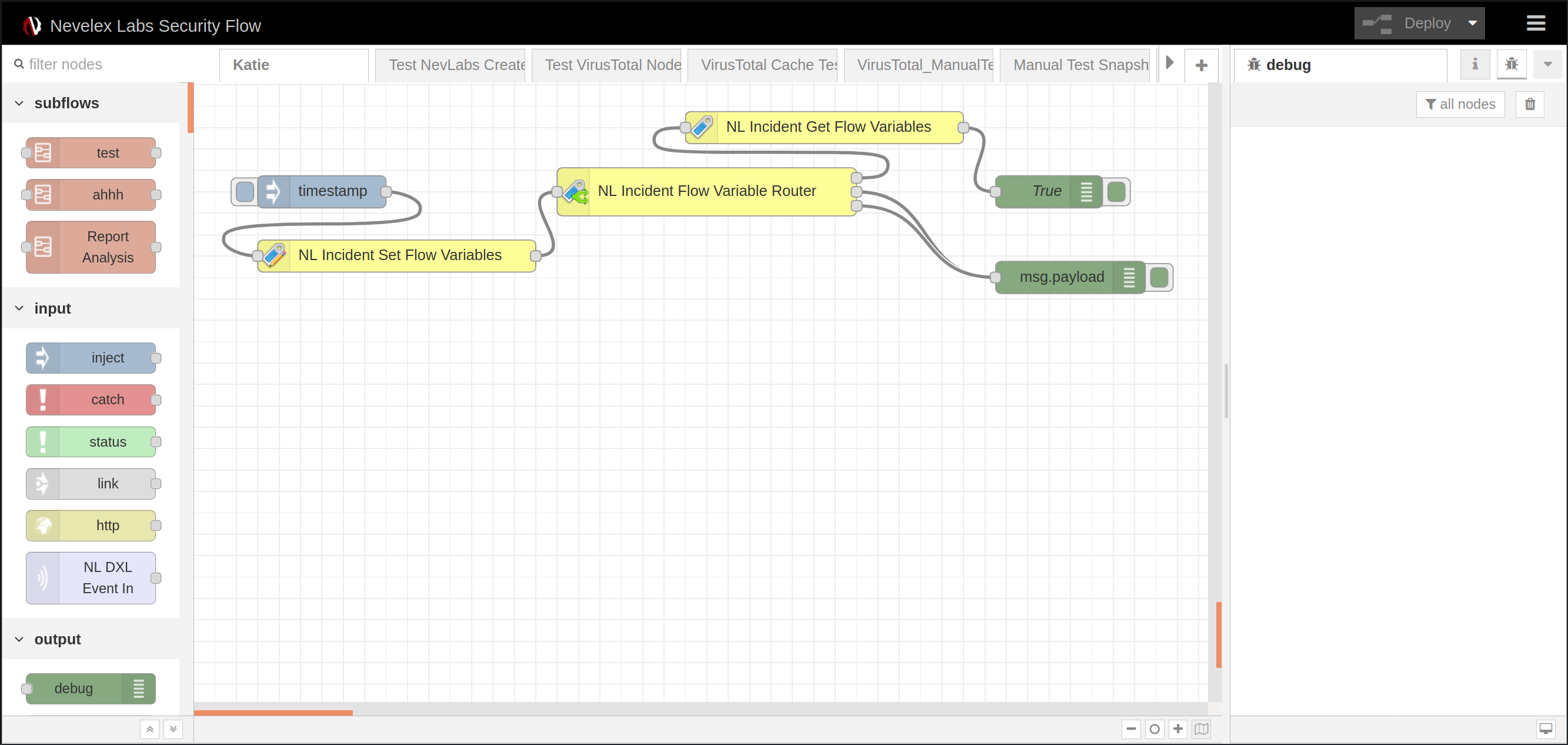
The italicized, green text is retrieved by the NL Incident Get Flow Variables node. The NL Incident Set Flow Variables node was configured to add JSON, string, and number variables to the flow.
"payload": {
    "flowVariables": {
      "#": 85,
      "json": {
        "domain": "baddomain.com"
      },
      "String": "Hello"
    }
  }
}
The NL Incident Flow Variable Router node was configured to route the message through the True output based on the Equals string value.
Metro Office Park
2950 Metro Drive, Suite 104
Bloomington, MN 55425
Phone: +1 952-500-8921
©Nevelex Labs, LLC. 2018-2026, All Rights Reserved.
EULA