

Incidents List
The Incidents List report displays a filterable list of Incidents. Each row in the report provides a toolbar to perform a variety of operations and is color coded to indicate the current status of the incident.
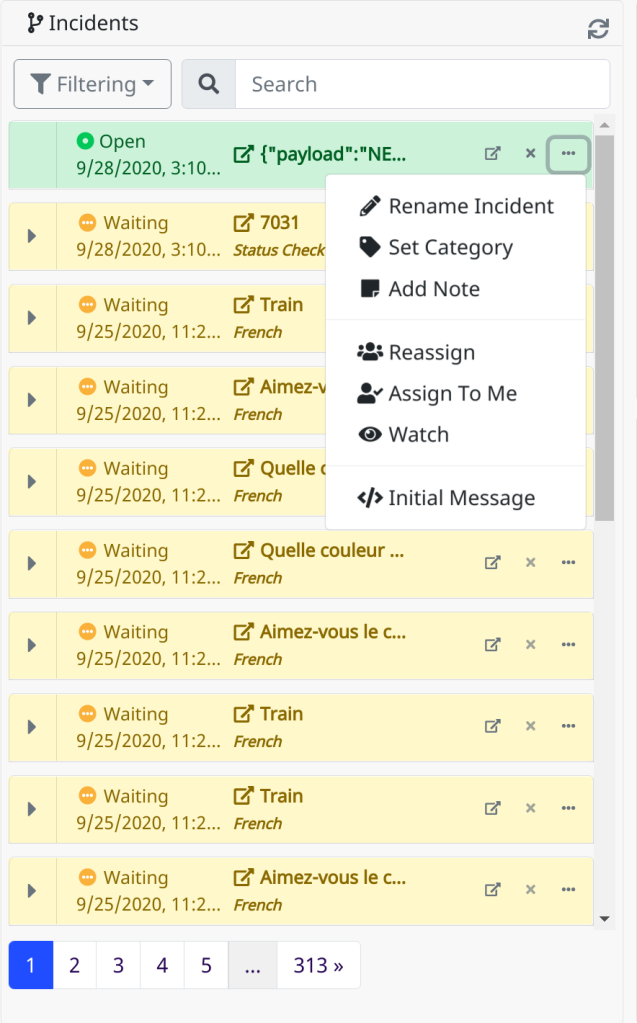
| Button | Description |
|---|---|
| Navigates to the incident's timeline. | |
If the incident status is not Waiting, this will close the incident. |
|
If the incident status is either Close by User or Closed by Flow, this will reopen the incident. |
|
| Opens additional incident control options. | |
| Rename Incident | Allows the user to give the incident a different name. |
| Set Category | Allows the user to set a category for a specific incident or Manage categories. |
| Add Note | Allows the user to add a note to the incident. |
| Reassign | Allows the user to assign the incident to any user in the system with the Manage Incidents permission. |
| Assign To Me | Assigns the incident to the current user. This button is only visible if the incident is not already assigned to the current user. |
| Watch | Marks the current user as a watcher of the incident if they are not currently watching. |
| Unwatch | Removes the current user as a watcher of the incident if they are currently watching. |
| Initial Message | Opens a dialog displaying the initial message which created the incident. |
| Filtering | Opens a dialog to configure the filters applied when loading the Incidents list. Incidents may be filtered by Status, Category, Assignee, and Creation Date. All filter settings persist across screen loads. |
Report Options
Not applicable to this report type.
Nevelex Labs, Main Office
Metro Office Park
2950 Metro Drive, Suite 104
Bloomington, MN 55425
Phone: +1 952-500-8921
©Nevelex Labs, LLC. 2018-2026, All Rights Reserved.
EULA