

Overview
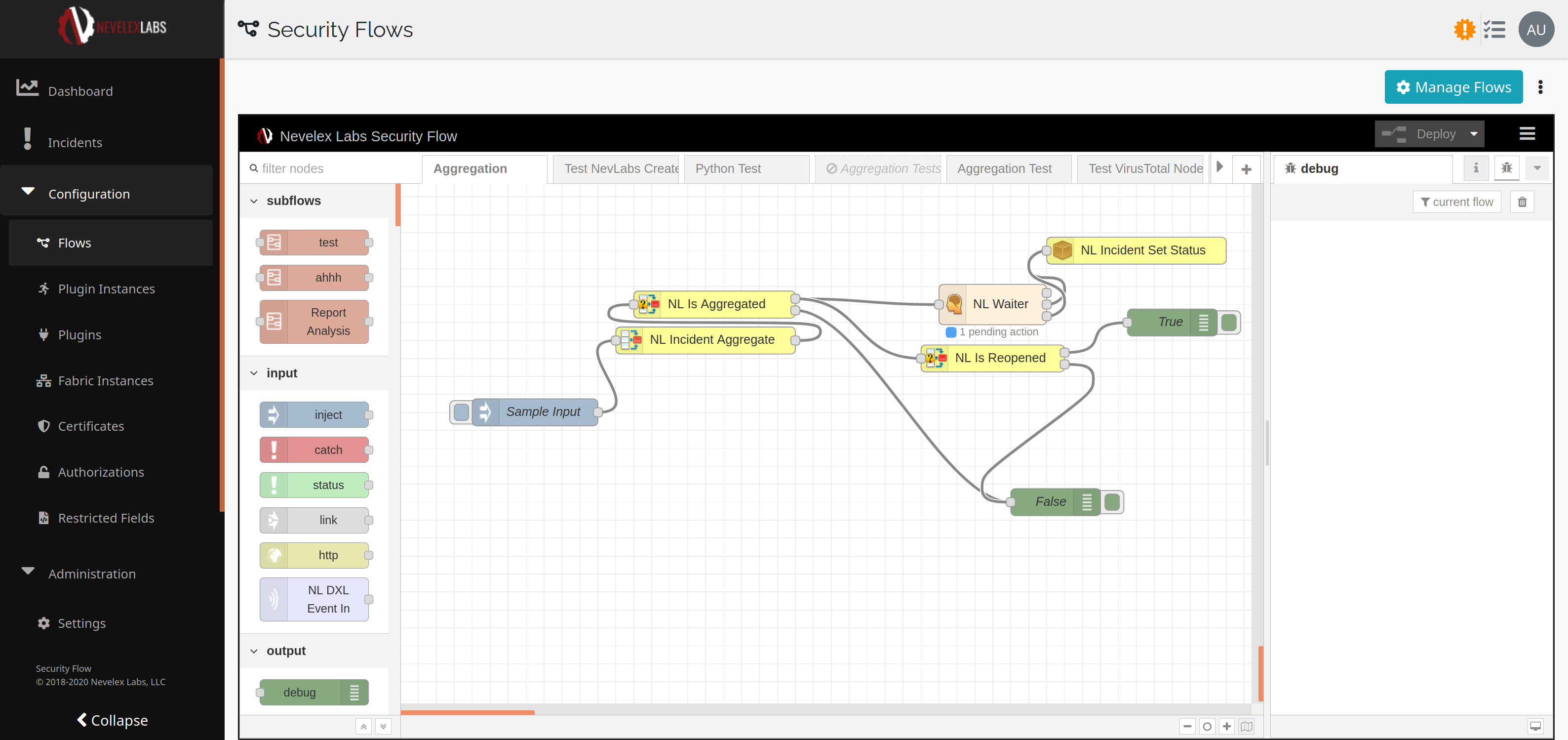
The Aggregate nodes provide the ability to check, route, or collect similar messages into the same incident. The aggregated messages are viewable on the Incident Timeline.
Functionality
The Aggregate nodes provide the following functionality:
- Group similar messages into an incident via the
NL Incident Aggregatenode. - Route messages based on existence of aggregated meta data via the
NL Is Aggregatenode. - Route aggregated messages based on reopened state via the
NL Is Reopenednode.
Flow Nodes
The display name of the node within the flows.
This node supports five modes for aggregating incidents.
- None: Never aggregate any incidents (default).
- Field Match: For a given source field of a message (or jsonata query of the message), aggregate together all messages whose field value exactly matches a previously checked message.
- Exact Match: For a given source field of the message (or jsonata query of the message), aggregate together all messages whose field exactly matches a given value. One can specify multiple values. Each value specifies a separate grouping of incidents. Useful to aggregate messages with known content.
- Keyword Match: For a given source field of the message (or jsonata query of the message), aggregate together all messages with a given keyword appearing as a word within the field. One can specify multiple keywords. Each keyword specifies a separate grouping of incidents. An incident is grouped with the first keyword it matches. Useful to aggregate messages with somewhat known content.
- Fuzzy Match: For a given source field of the message (or jsonata query of the message), aggregate together all messages for which this field is sufficiently similar to the message that started the incident. With this method, one can specify a similarity threshold. Messages matched with the fuzzy matcher get a similarity attribute added to the message which can be inspected to assist when establishing a threshold.
If aggregation is configured to Check Only, by checking Keep Incidents Separate, then aggregation checks are still performed, but the actual process of aggregating the message into a single incident does not happen. The performed flag in the aggregation section of the message is set to false if Keep Incidents Separate is checked, otherwise it is set to true if aggregation was performed and false if aggregation was not performed.
The Source defines the portion of the message being analyzed when determining whether or not to aggregate the message.
With all of the aggregation modes (except None), one can provide a number of occurrences after which a closed incident will be re-opened. For example, if this value is 10 and the incident is closed, after ten more messages match the incident, the incident will be re-opened. Only visible if Keep Incidents Separate is unchecked.
aggregation meta data at its root. When a message arrives, this node will check if the message is aggregated or not and forward the message to the corresponding output. If the original aggregation node was configured to Keep Incidents Separate, this node will function in the same way.
The display name of the node within the flows.
The incoming message is passed to this output if the incoming message has aggregation meta data at its root.
The incoming message is passed to this output if the incoming message does not have aggregation meta data at its root.
Keep Incidents Separate, this node will always route out the False path.
The display name of the node within the flows.
The incoming message is passed to this output if the incoming message has aggregation meta data at its root and the aggregation.reopened flag is true.
The incoming message is passed to this output if the incoming message does not have aggregation meta data at its root or the aggregation.reopened flag is false.
Learn More
JSON Message Format
Success
The NL Incident Aggregate node was configured to use Field Match and to reopen after 5 matches.
The italicized, green text is added by the NL Incident Aggregate node. The first four aggregation matches adds the aggregation section with reopened: false and performed: true. The fifth aggregation changes the value of reopened to true. The first four aggregation operations would produce the following:
  {
    "topic": "",
    "_msgid": [message ID],
    "payload": {...}
    "aggregation": {
      "reopened": false,
      "performed": true,
      "similarity": 1,
      "aggregatingBy": {
        "id": "76162793.21506",
        "name": "NL-Incident-Aggregate"
      }
    },
    "timestamp": "2020-07-22T20:35:25.803Z",
    "timestampCreated": "2020-07-22T20:35:25.740Z"
  }
The fifth incident reopens the Incident, as indicated by the reopened flag being set to true.
  {
    "topic": "",
    "_msgid": "615aed62.727464",
    "payload": {...}
    "aggregation": {
      "reopened": true,
      "performed": true,
      "similarity": 1,
      "aggregatingBy": {
        "id": "76162793.21506",
        "name": "NL-Incident-Aggregate"
      }
    },
    "timestamp": "2020-07-22T20:35:25.480Z",
    "timestampCreated": "2020-07-22T20:35:25.335Z"
  }
Metro Office Park
2950 Metro Drive, Suite 104
Bloomington, MN 55425
Phone: +1 952-500-8921
©Nevelex Labs, LLC. 2018-2026, All Rights Reserved.
EULA